Beyond SPAN: How NetFlow and sFlow Close the Gaps in Device Visibility

Most connected device security programs start with the same assumption: mirror the network traffic, point it at a monitoring platform to analyze it, and consider visibility solved. Switched Port Analyzer (SPAN) traffic enables that analysis by making a streamed copy of network data available, without slowing or modifying the original stream.
While SPAN traffic analysis (and its equivalents under different names – Test Access Point (TAP) or port mirroring) is the heart of safe network traffic analysis, it can be, on its own, incomplete. Switch port capacity, SPAN session limits, traffic prioritization at the switch level, and topology all shape what actually reaches the collector, which means some devices, subnets, and conversations never show up at all.
That is the gap. SPAN’s less glamorous cousins, NetFlow and sFlow, were built about a decade later in the 2000s to help address SPAN’s shortcomings. Neither replaces SPAN. Both extend what a connected device security platform knows about what’s on the network, using data that switches and routers are already generating.
SPAN Traffic Gets You Most of the Way
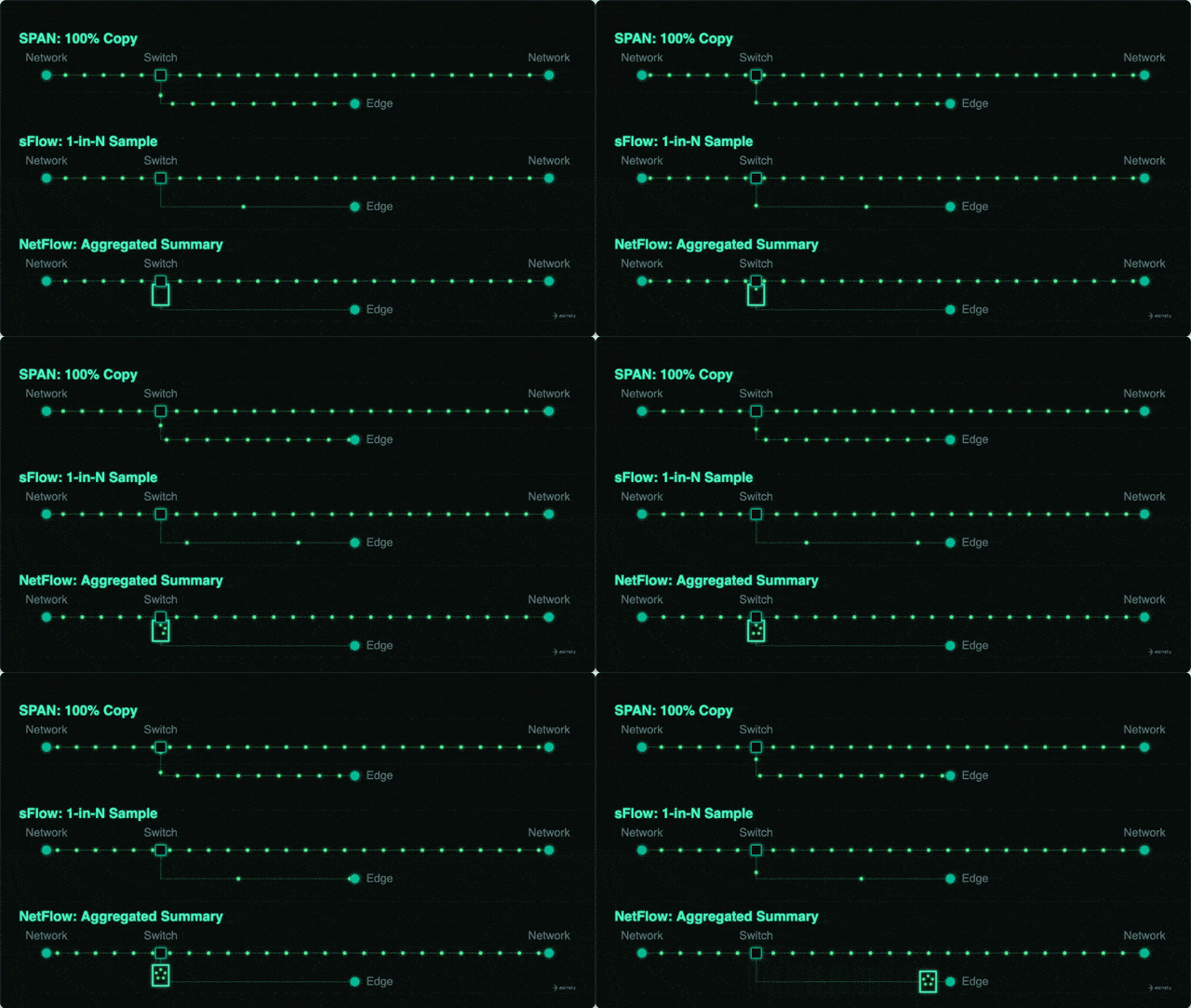
SPAN works by copying traffic from one or more switch ports, or an entire VLAN, to a monitoring port, where Asimily’s Proactive Cyber Defense Platform can perform deep packet inspection to build an inventory of Internet of Things (IoT), operational technology (OT), Internet of Medical Things (IoMT), and IT devices. It is a proven method, and it is the backbone of most passive discovery today.
The catch is coverage. A switch has a finite number of ports it can mirror at once. Traffic on segments that are not spanned, or that moves between switches never touched by a SPAN session, will be invisible to any monitoring solution depending on seeing that traffic. Over time, that adds up to devices, IP ranges, and communication paths that are effectively invisible, not because they are hidden, but because nobody pointed a mirror at them.
Passive SPAN monitoring is Asimily’s universal baseline. It is complemented by active safe scanning where appropriate: for devices that tolerate it and where the organization has authorized it, direct queries confirm attributes that passive observation can only infer. Taken together, passive monitoring and active safe scanning give the most complete picture of what is on the network. Asimily NetFlow and sFlow extend that picture further by reaching the traffic that SPAN cannot.
What NetFlow Adds
NetFlow is a flow-export protocol supported on most enterprise switches and routers. Instead of copying full traffic, the switch summarizes conversations as flow records: source and destination IP, ports, transport protocol, and byte and packet counts. Asimily’s edge appliances listen for these records on UDP port 2055.
To set up NetFlow on a switch, use the appropriate edge appliance IP from the NetFlow connector configuration page under Integrations → Network Traffic Sources within the Asimily portal. Once NetFlow has been configured on a switch, the status indicator on the NetFlow connector configuration page will indicate if the packets are successfully received (or not) by the corresponding edge appliance.
The value shows up fastest in the gaps. NetFlow routinely surfaces IPs and subnets faster than SPAN alone might, filling in the flow-level picture — who talked to whom, how much, over what protocol — for corners of the network that were previously dark.
What sFlow Adds
sFlow takes a different approach to the same problem. Rather than aggregating every flow, sFlow samples packets and interface counters at the switch or router level. That sampling is the whole point: it scales cleanly on high-speed, high-volume networks and puts far less load on the switch’s own resources than exhaustive flow accounting would.
sFlow also has one advantage NetFlow does not. Because it forwards the entire sampled packet, headers and payload included, rather than just flow metadata, it gives a collector more to work with per sample, even though it is not examining every packet. Asimily traffic monitoring does not depend on analyzing every single packet. Nearly every network drops the occasional packet, and nearly every device eventually communicates enough to be detected, so neither routine loss nor quiet devices undermine the analysis.
Asimily’s Edge appliances (data collectors) receive sFlow on their management interface over UDP port 6343. Setup lives under Integrations, then Network Traffic Sources, on the sFlow tile: pick the Edge appliance that will act as the receiver, note its IP address and collector port, then point the switch’s sFlow agent at that address. The sFlow tile in the portal reflects whether data is flowing once the switch side is configured.
Two Tools, One Job
NetFlow and sFlow are not competing standards but rather different trade-offs on the same problem: how much flow data to capture, and at what cost to the network gear generating it. NetFlow’s full accounting suits networks where completeness matters more than scale. sFlow’s sampling suits networks where speed and switch performance are the constraint. Feeding both into a platform that also ingests SPAN traffic means the inventory is built from whichever source actually saw a given conversation, rather than depending on one method to catch everything.
That multi-source correlation also holds in edge cases. Containerized deployments, for example, do not expose container IPs externally, so NetFlow and sFlow traffic targets the Docker host’s IP address instead of the standard UDP 2055 and UDP 6343 ports, using port-mapping rules to forward the packets directly to the container’s listening ports.
Why the Extra Traffic Sources Matter
An inventory is only as good as what fed it. Incomplete visibility into what is actually on the network and what it is communicating with is a central reason the gap between intent and execution remains this wide. Segmentation policy built on a partial device list will misjudge the very traffic it is supposed to govern.
NetFlow and sFlow are not a fix for a single blind spot. They are additional lenses that, layered onto SPAN-based discovery and active safe scanning, make the inventory closer to what the network is actually doing rather than what one mirrored port can catch. That richer inventory is also what downstream risk analysis depends on. Asimily uses NetFlow and sFlow data in its ATT&CK Analysis- Asimily’s unique method of determining if a theoretical vulnerability carries a real risk. It determines whether a vulnerability is actually exploitable on a specific device in a specific network topology. The accuracy of that determination depends on knowing the full picture of what that device communicates with and what can reach it.
For teams building out that inventory, the practical takeaway is simple: turn on the traffic sources your switches already support. NetFlow and sFlow are usually a configuration change away, not a new deployment, and every additional source narrows the gap between the network you can see and the network you actually have.


Secure Every IoT Device.
Automatically.
Cyber threats move fast — so should you. Asimily gives instant inventory and smart, prioritized risk mitigation insights for every IoT, OT, and IoMT device — so you can take action before threats strike.